Qualcomm HS-USB QDLoader 9008 This is a USB driver. It is used for mobile devices with Qualcomm processor. If you are using a mobile phone with Qualcomm processor and it is not booting or the OS/firmware is not working properly, then this USB driver connects the turned off mobile phone to the computer. The computer recognizes your device through this USB driver.
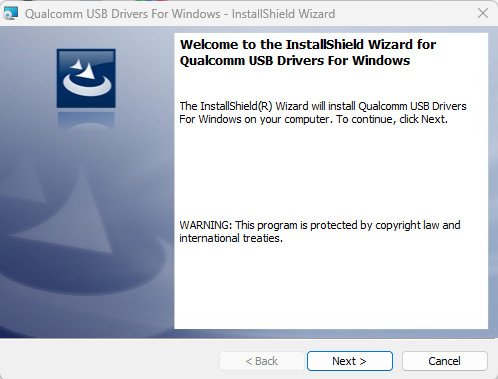
| File Name | Qualcomm HS-USB QDLoader 9008 |
| Version | v1.2 |
| Size | 18MB |
| Supports | All Windows |
When is the HS-USB QDLoader 9008 useful?
This USB driver is used to fix a variety of problems. It’s very lightweight and useful. Devices with Qualcomm processors often experience numerous problems that require this USB driver. We’ve detailed these issues below.
- Dead Phone / No Power Issue
- Bootloop Problem
- Phone Hard Brick
- Fastboot/Recovery Not Opening
- System Crash / OS Corrupt
- Firmware Flash Fail
- Partition Corrupt (EMMC/UFS error)
- Only Qualcomm 9008 mode showing
- EDL Mode (Emergency Download Mode) automatically engaging
- IMEI / Modem Partition Damage
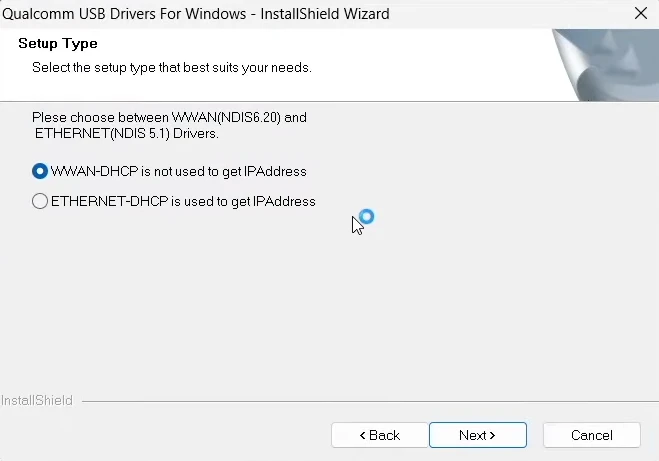
How to install the QDLoader Driver?
The steps below explain how to install the QDLoader 9008 USB driver on Windows:
- Extract the downloaded driver zip file.
- Run QDLoader_HS-USB_Driver_Setup.exe
- Follow the on-screen instructions.
- Click on “Install Anyway” (Windows will show a warning – ignore it).
The installation will now be successful.
What is Qualcomm 9008 Mode (EDL Mode)?
EDL Mode is a low-level recovery mode typically found in devices equipped with Qualcomm chipsets. It is primarily used to repair “dead” (unresponsive) phones, as well as to resolve a wide range of other issues. It is most frequently utilized for tasks such as firmware flashing, bootloader repair, and FRP (Factory Reset Protection) bypassing. Occasionally, if a mobile device becomes completely unresponsive after being flashed with an incorrect file, it can be revived using Qualcomm 9008 Mode.
Popular Versions:
- Qualcomm USB Driver 32-bit
- Qualcomm USB Driver 64-bit
- QDLoader HS-USB Driver v1.0
- Qualcomm HS-USB Driver 9008 Latest Setup
System Requirements
Detailed information regarding the minimum system requirements for installing the Qualcomm 9008 driver on your laptop or computer is provided below:
- Windows 7 / 8 / 10 / 11
- 32-bit or 64-bit OS
- USB Cable (in working condition)
- Minimum 2GB RAM
- Administrator Access
Supported Processors & Brands
Listed below are the names of some mobile companies whose devices, featuring Qualcomm chipsets, support this driver:
| Supported Brands | Supported Qualcomm Processors |
|---|---|
| Xiaomi | Snapdragon 200 Series |
| Redmi | Snapdragon 400 Series |
| Poco | Snapdragon 600 Series |
| Realme (Qualcomm Models) | Snapdragon 700 Series |
| Oppo | Snapdragon 800 Series |
| Vivo | Snapdragon 8 Gen Series |
| Samsung (Snapdragon Variant) | Snapdragon 200 Series |
| OnePlus | Snapdragon 400 Series |
| Motorola | Snapdragon 600 Series |
| Nokia | Snapdragon 700 Series |
| Lenovo | Snapdragon 800 Series |
| Asus | Snapdragon 8 Gen Series |
| Sony Xperia | All Snapdragon Supported |
If you work in mobile repair or flashing, the QDLoader 9008 Driver is absolutely essential for you. This is because it provides direct access to a “dead” device, thereby enabling its repair. Occasionally, a mobile device may become unresponsive (dead) during the firmware flashing process—a situation that poses a significant problem. The QDLoader 9008 offers you the means to resolve this issue.